

- nDPI
- Layer-7 built in
- Shop
- licenses and pricing in the ntop shop
Who should choose PF_RING FT
PF_RING FT is a flow table library for developers who build flow-based monitoring or security applications. Choose it when you want flow records, nDPI classification and Layer-7 filtering from a clean API instead of writing packet decoding and flow handling yourself.
- You build a high-speed NetFlow-like probe.
- You need Layer-7 classification, categories, metadata and flow risks out of the box.
- You want to shunt elephant flows to relieve Suricata, Snort or Bro.
Ideal use case for PF_RING FT
- Environment
- x86 64-bit systems, multi-core and NUMA, with libpcap, PF_RING, PF_RING ZC or DPDK capture.
- Team
- developers of monitoring and security products.
- Technical requirements
- C API, low CPU and memory footprint, flows exportable in any format.
- Problem solved
- programmable flow aging, DPI and filtering without handling nDPI directly.
Deployment scenarios
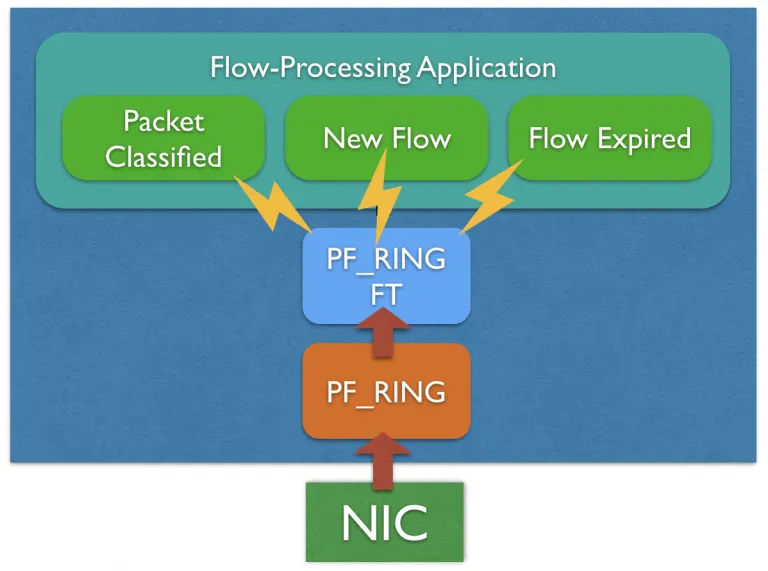
Develop a High-Speed NetFlow Probe
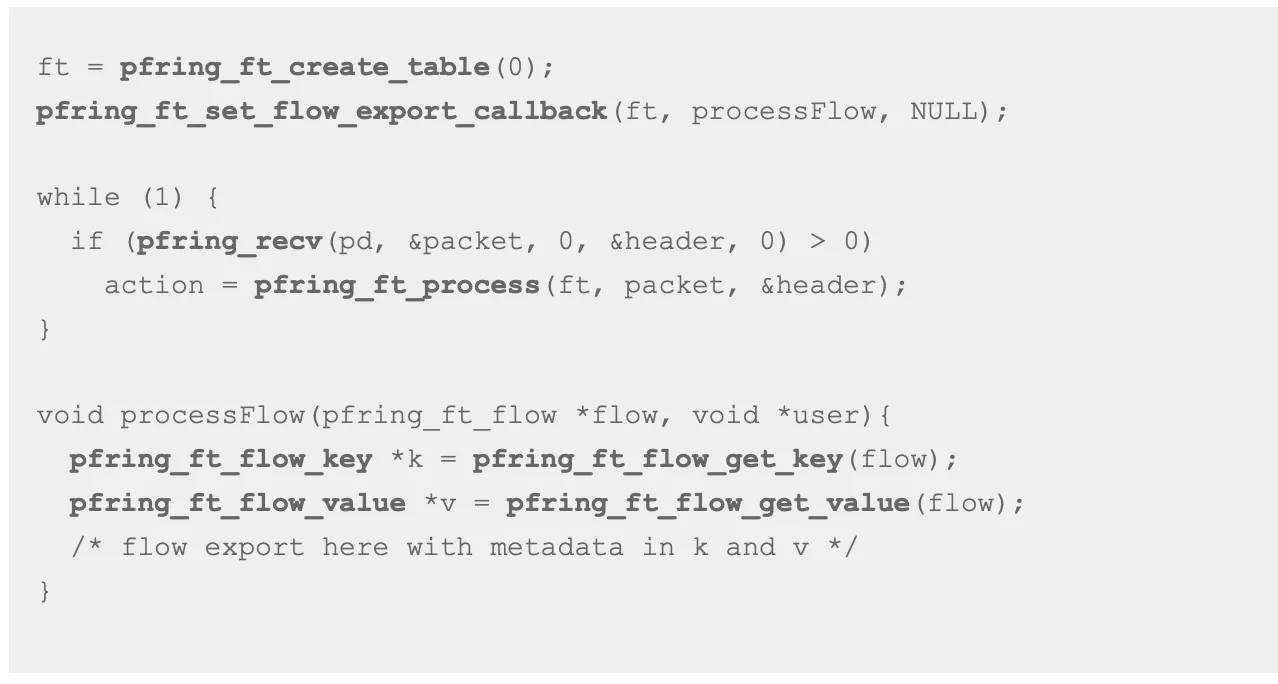
Designing and implementing a flow processing application on top of PF_RING FT is quite straightforward as it provides a clean API that can be used to do complex things in a few lines of code. The following code snippet shows how it is easy to capture traffic and export flow informations with PF_RING FT. For a full code example have a look at the demo applications available in PF_RING. For more information please refer to the guide and API documentation.
Layer-7 Traffic Classification with nDPI
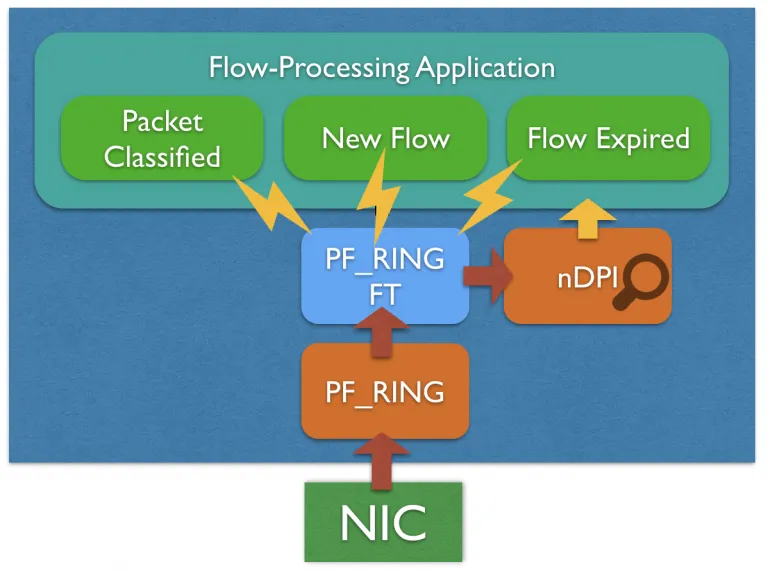
PF_RING FT is natively integrated with nDPI for providing L7 protocol informations out of the box. The application itself does not need to deal with the nDPI library directly as everything happens behind the scenes, getting the L7 protocol is just as easy as enabling L7 detection through the API and reading the L7 protocol from the flow metadata. In addition to protocol detection, PF_RING FT also categorizes the traffic leveraging the nDPI categories, extracts metadata, detects flow risks.
Application Filtering and Shunting
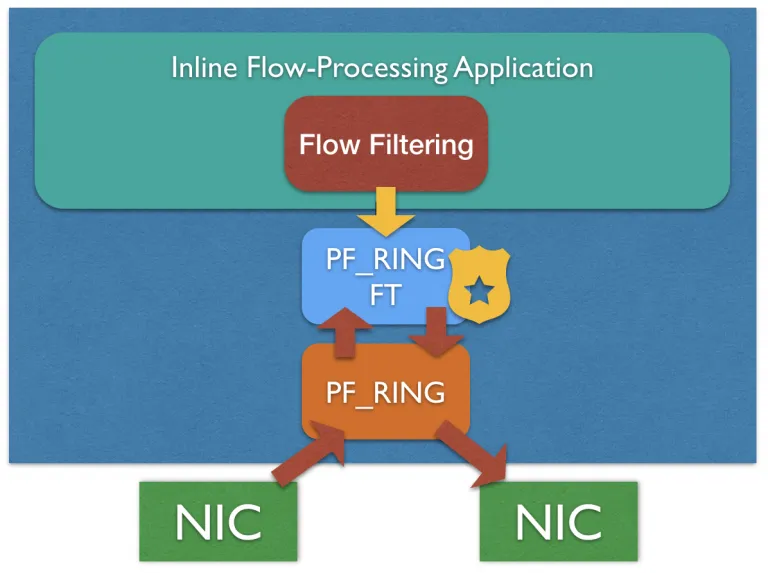
PF_RING FT features a L7 filtering engine that can be used by inline applications for filtering flows based on the application protocol. In addition to the built-in filtering engine, the application can mark flows for filtering or shunting them based on custom policies.
IDS/IPS Acceleration
The PF_RING FT Layer-7 filtering engine can also be used for accelerating CPU-bound applications, such as IDS/IPSs including Suricata, Bro and Snort, shunting flows based on the application protocol. Discarding elephant flows is becoming a common yet effective practice for reducing the amount of traffic an IDS/IPS need to inspect (typically multimedia traffic), dramatically reducing packet loss and improving the system performance.
Suricata has native support (bypass) for shunting elephant flows using eBPF, this means that the application is injecting filtering rules (5-tuples) in kernel space as soon as an elephant flow is detected. This approach has come limitations: it requires a ruleset in Suricata able to detect all multimedia protocols, packet parsing is not flexible as eBPF programs cannot loop (it does not work with encapsulations, including vlan and QinQ), it cannot keep flow state (making it complicated to handle flows expiration).
Leveraging on PF_RING FT, a PF_RING-based or Libpcap-based application can take advantage of L7 shunting without changing a single line of code. Since PF_RING FT is based on nDPI for protocols detection, filtering multimedia traffic mens just listing the protocol names in a configuration file. More information for accelerating Suricata or other IDSs can be found in the User’s Guide.
PF_RING FT alternatives, compared
Same criteria for each option: role, when to choose it, limits and cost.
nProbe and nProbe Cento
- Role: Ready-made flow probes.
- Choose it when: You want a finished probe, not a library.
- Limits: Fixed feature set.
- Cost: See the ntop shop for pricing.
PF_RING ZC
- Role: Packet capture and distribution.
- Choose it when: You need packets, not flows.
- Limits: No flow table or DPI.
- Cost: See the ntop shop for pricing.
When PF_RING FT is not the right choice
- It is a library: there is no interface. You must write the application.
- x86 64-bit only.
- If a ready probe fits, nProbe or Cento is faster to deploy.
Key Features
- High-performance generation of flow records (NetFlow/IPFIX-like) directly from live traffic
- Programmable flow processing with configurable flow aging
- Built-in Deep Packet Inspection (DPI) via nDPI to classify protocols and applications
- Flexible export format, flows can be exported in any format
- Efficient use of multi-core systems with NUMA awareness
- Easy integration with zero-copy packet processing frameworks like PF_RING ZC
- Low resource footprint, designed for high-throughput with minimal CPU and memory usage
Try PF_RING FT on your own traffic.
Tech Specs
Platforms
- Linux
UI/API
- C API compatible with PF_RING, PF_RING ZC, libpcap, DPDK
Requirements
x86 64-bit CPU (Intel and AMD)
Protocols
- Ethernet
- IPv4/IPv6
- TCP/UDP/ICMP
- GTP/GRE/MPLS/VXLAN/PPP
- 450+ Layer-7 application protocols supported by nDPI
DOCS
Frequently asked questions
Develop a High-Speed NetFlow Probe
Designing and implementing a flow processing application on top of PF_RING FT is quite straightforward as it provides a clean API that can be used to do complex things in a few lines of code. The following code snippet shows how it is easy to capture traffic and export flow informations with PF_RING FT. For a full code example have a look at the demo applications available in PF_RING. For more information please refer to the guide and API documentation.
Layer-7 Traffic Classification with nDPI
PF_RING FT is natively integrated with nDPI for providing L7 protocol informations out of the box. The application itself does not need to deal with the nDPI library directly as everything happens behind the scenes, getting the L7 protocol is just as easy as enabling L7 detection through the API and reading the L7 protocol from the flow metadata. In addition to protocol detection, PF_RING FT also categorizes the traffic leveraging the nDPI categories, extracts metadata, detects flow risks.
Application Filtering and Shunting
PF_RING FT features a L7 filtering engine that can be used by inline applications for filtering flows based on the application protocol. In addition to the built-in filtering engine, the application can mark flows for filtering or shunting them based on custom policies.
IDS/IPS Acceleration
The PF_RING FT Layer-7 filtering engine can also be used for accelerating CPU-bound applications, such as IDS/IPSs
including Suricata, Bro and Snort, shunting flows based on the application protocol. Discarding elephant flows is
becoming a common yet effective practice for reducing the amount of traffic an IDS/IPS need to inspect (typically
multimedia traffic), dramatically reducing packet loss and improving the system performance.
Suricata has
native support (bypass) for shunting elephant flows using eBPF, this means that the application is injecting
filtering rules (5-tuples) in kernel space as soon as an elephant flow is detected. This approach has come
limitations: it requires a ruleset in Suricata able to detect all multimedia protocols, packet parsing is not
flexible as eBPF programs cannot loop (it does not work with encapsulations, including vlan and QinQ), it cannot
keep flow state (making it complicated to handle flows expiration).
Leveraging on PF_RING FT, a PF_RING-based
or Libpcap-based application can take advantage of L7 shunting without changing a single line of code. Since PF_RING
FT is based on nDPI for protocols detection, filtering multimedia traffic mens just listing the protocol names in a
configuration file. More information for accelerating Suricata or other IDSs can be found in the User’s Guide.
nProbe and nProbe Cento
- Role: Ready-made flow probes.
- Choose it when: You want a finished probe, not a library.
- Limits: Fixed feature set.
- Cost: See the ntop shop for pricing.
PF_RING ZC
- Role: Packet capture and distribution.
- Choose it when: You need packets, not flows.
- Limits: No flow table or DPI.
- Cost: See the ntop shop for pricing.
Ready to see PF_RING FT on your network?
Download the free Community edition, compare editions and buy in the shop, or talk to the ntop team about your requirements.