
nProbe logo

nProbe™

Extensible NetFlow v5/v9/IPFIX Probe and Collector

Nprobe short
v5, v9
NetFlow
IPFIX
and sFlow
Layer-7
visibility with nDPI

Who should choose nProbe

nProbe is a NetFlow v5/v9/IPFIX probe and collector. Choose it to turn packets from a mirror port or TAP into flows, to collect flows from routers and switches, or to convert between flow formats. It exports to ntopng, to commercial collectors and to Kafka, ElasticSearch, Syslog and databases.

  • You need a probe on a mirror or TAP, or a collector for NetFlow, IPFIX and sFlow.
  • You want Layer-7 visibility (450+ applications with nDPI) in every flow record.
  • You must feed an existing collector such as Cisco, Plixer or SolarWinds, or send flows to ntopng.

Ideal use case for nProbe

Environment
border gateways, switches and routers that export NetFlow, or links up to multi-Gbit. Runs on Linux, FreeBSD, Windows x64, macOS and Raspberry Pi OS.
Team
network teams that run a flow collector or ntopng and need accurate accounting.
Technical requirements
memory footprint under 2 MB regardless of network size. 1 Gbit with a dual-core CPU and vanilla PF_RING, more with PF_RING ZC.
Problem solved
replace low-speed embedded probes, add application data to flows, and upgrade flow versions without touching routers.

Deployment scenarios

  • Flow Probe on Mirror/TAP

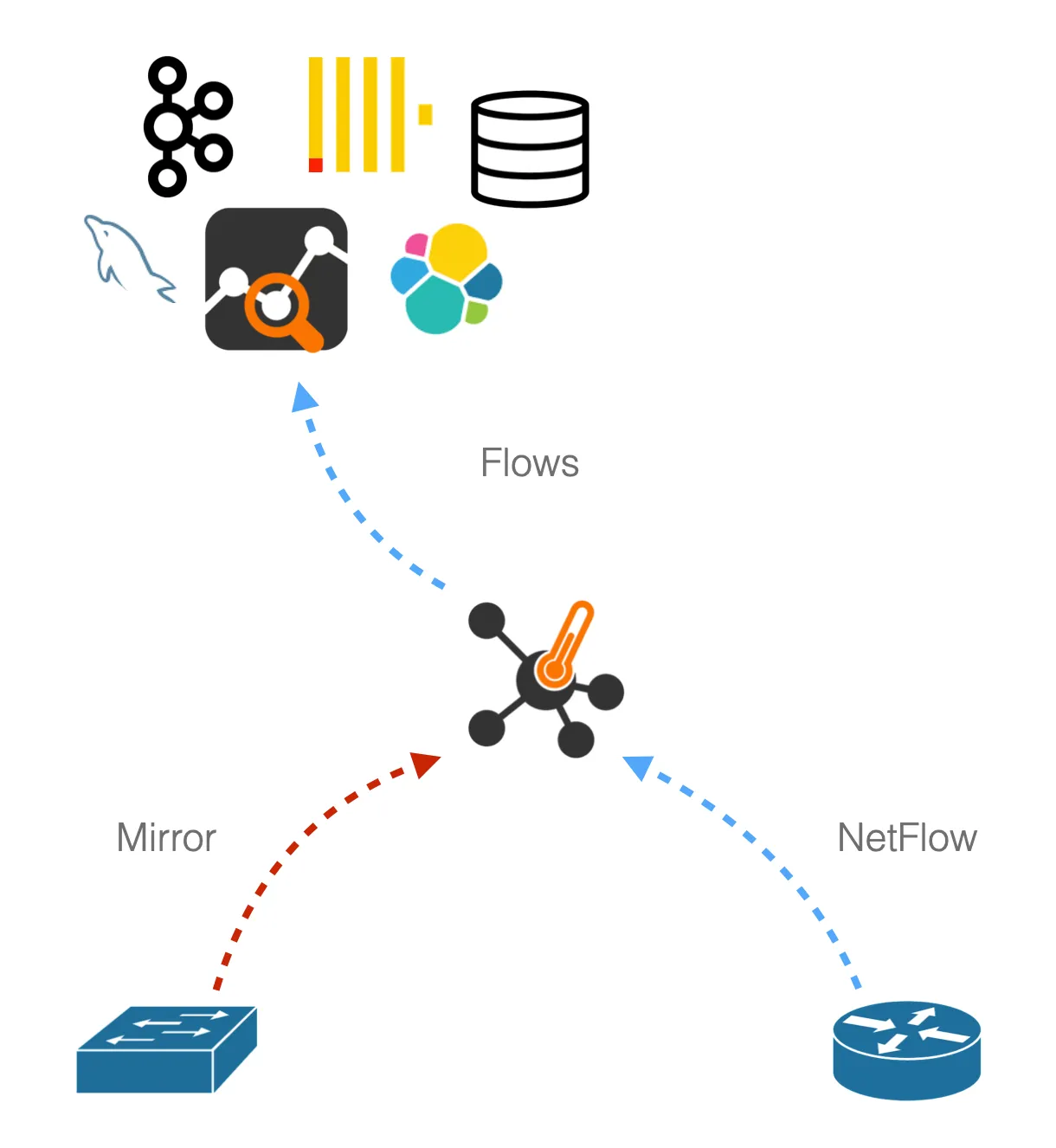
    This mode can be used to analyse traffic from a mirror or TAP device and export flows in NetFlow v5/v9/IPFIX format or to ntopng.

    Mirror (SPAN) ports or TAP devices allow network monitoring tools to observe all packets flowing through the network for for network visibility, troubleshooting, threat detection, and capacity planning, without generating traffic or altering the data path.

    • Mirror Port (SPAN): available on most managed switches, duplicates traffic from selected ports or VLANs to a dedicated monitoring port.
    • TAP Device: transparently copies all network traffic at the physical layer, acting as a bump-in-the-wire and providing a fail-safe method for capturing traffic.

    A physical NIC card connected to a mirror can be monitored by nProbe by simply specifying its interface name. This configuration can be used to monitor a mirror port from a switch, or in conjunction with a TAP device by aggregating two directions from two network interfaces.

  • NetFlow Collector

    This mode can be used to collect flows in NetFlow v5/v9/IPFIX format and deliver flows to ntopng.

  • NetFlow Proxy

    In proxy mode it is possible to convert from/to IPFIX/NetFlow v5/v9 in order to smoothly upgrade to newer NetFlow protocol versions while capitalizing on previous protocol versions. So you can for instance convert flows coming from your v5 router into IPFIX and vice-versa.

  • Inline IPS

    In this configuration nProbe acts as a bridge device by applying Layer-7 policies to the bridged traffic.

nProbe alternatives, compared

Same criteria for each option: role, when to choose it, limits and cost.
  • nProbe Cento

    • Role: High-speed flow probe for 1, 10, 40 and 100 Gbit.
    • Choose it when: Your links are faster than a multi-Gbit probe handles.
    • Limits: Linux only. See the ntop shop for pricing.
    • Cost: See the ntop shop for pricing.
  • nBox NetFlow

    • Role: Turn-key 1U appliance with nProbe or nProbe Cento preinstalled.
    • Choose it when: You prefer hardware you do not assemble.
    • Limits: Hardware choice and price by quote.
    • Cost: Get a quote
  • ntopng alone

    • Role: Captures packets itself.
    • Choose it when: One site, mirror port, no external collector.
    • Limits: Flow collection from exporters needs nProbe.
    • Cost: Community free

When nProbe is not the right choice

  • nProbe produces and forwards flows. It is not the dashboard: pair it with ntopng or another collector to visualize them.
  • For 100 Gbit links use nProbe Cento instead.
  • It does not store packets: use n2disk when packet-level evidence is needed.
  • Performance figures on this page are per core, from a specific test setup. Size your hardware with the sizing notes.

Key Features

  • Layer-7 visibility and accounting with 450+ detected applications (e.g. Teams, BitTorrent, Citrix, ...)
  • Integrate with ntopng to visualize, collect, and analyze monitored traffic
  • NetFlow v5/v9/IPFIX/sFlow/NetFlow-lite support for efficient flow handling and legacy routers compatibility
  • Flexible NetFlow export for the creation of custom NetFlow templates, with optional PEN support
  • Convert Cisco ASA and sFlow into NetFlow v5/v9/IPFIX
  • Native support for PF_RING Zero Copy (ZC) for ultra-high speed packet capture
  • Analysis of mobile traffic (GTP) with IMSI-to-Traffic correlation GTP-C/GTP-U.
Show 7 more
  • Agent mode support on Windows and Linux systems (eBPF based) to augment network metadata with users and processes
  • IPS inline mode for blocking and shaping traffic at Layer-7
  • Flow export to Kafka, ElasticSearch, Apache™, Syslog, MySQL/MariaDB, Syslog, Splunk (via TCP streaming)
  • Support of tunneled traffic (GRE, PPP, VXLAN, GTP) and export of inner/outer envelope/packet information
  • VoIP (SIP and RTP) traffic analysis including voice quality and pseudo MOS
  • HTTP, DNS, SMTP/POP/IMAP/Diameter/Radius/DHCP/GTP (v0, v1, v2)/modBus/NetBios/SSDP protocol analysis and logs generation
  • Fully interoperable with commercial collectors such as IsarFlow, Cisco, Dartware, Arbor Networks, Plixer, NetFlow Auditor, SolarWinds Orion NTA, Andrisoft, and many others.
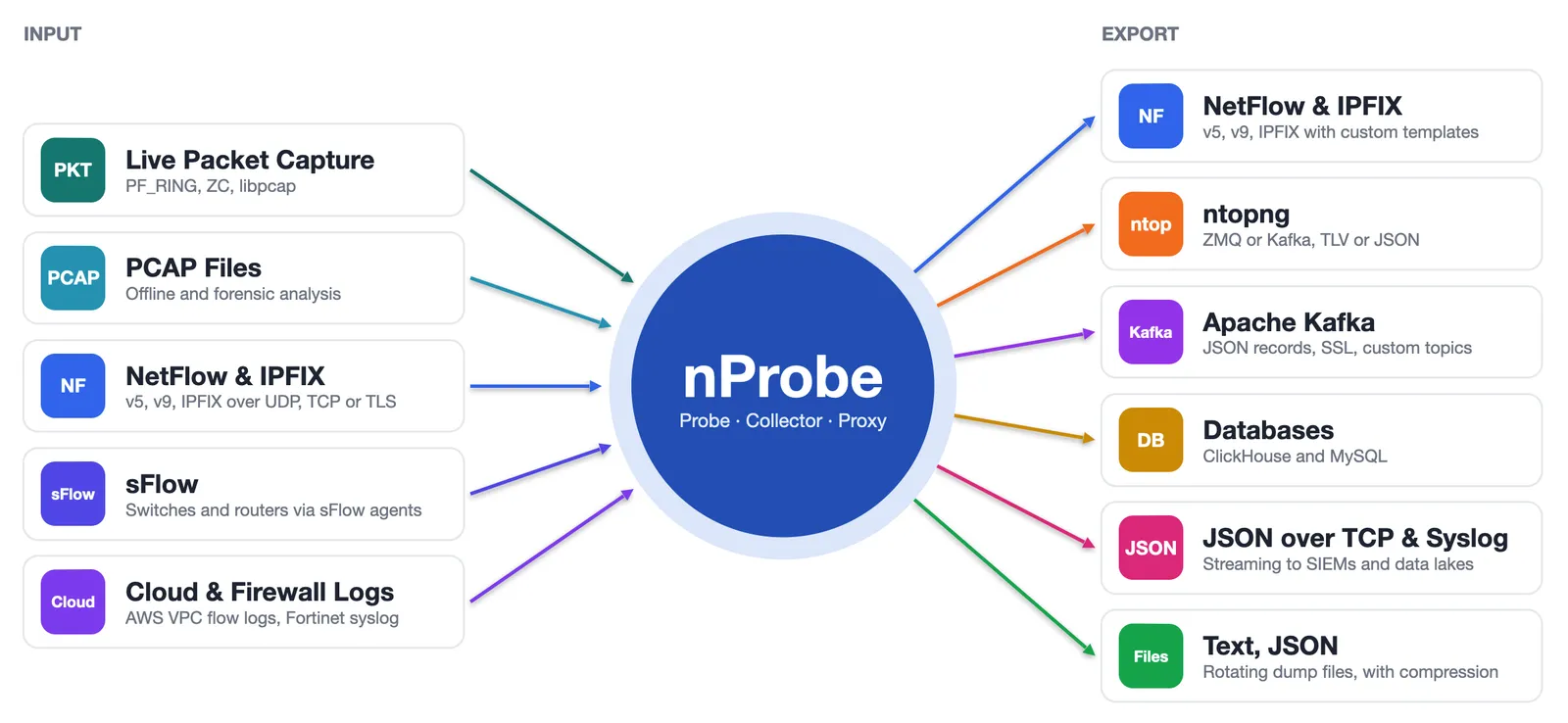
nProbe input and export formats

Works great with ntopng!

nProbe works even better when paired with ntopng. Unlock advanced flow-based traffic analysis and deep visibility into your network!

Try nProbe™ on your own traffic.

Choose Your Version

Did you already install the software?

Install

Select the nProbe version that fits your needs. Different versions unlock different features, plugins and capacity.

Check the comparison table for the features set about the various versions.

Pro

Pricing in the ntop shop

  • Layer-7 traffic inspection with nDPI
  • NetFlow/sFlow flow collection
  • PF_RING packet capture acceleration
  • NetFlow and ZMQ export
  • IPv4 deduplication
  • Modbus support
Best for
SMEs
Most popular: M

Enterprise S/M/L

Pricing in the ntop shop

  • All Pro features included
  • Kafka, ElasticSearch, JSON export
  • NetFlow-lite collection
  • Deep protocol analysis for HTTP, DNS, IMAP, RTP, GTP, ...
  • Agent mode
  • Flow collection deduplication
Best for
large organizations, telcos, ...

Tech Specs

Platforms

  • Linux
  • FreeBSD (including OPNsense and pfSense)
  • Windows x64 (including Windows 10/11)
  • macOS
  • RaspbianOS

Export Formats

  • NetFlow v5/v9/IPFIX
  • ZMQ (ntopng)
  • Kafka
  • Text file (CSV)
  • MySQL/MariaDB
  • ElasticSearch
Show 2 more
  • TCP Stream
  • Syslog

Requirements

  • Limited memory footprint (less that 2 MB of memory regardless of the network size) and CPU savvy
  • Designed for running on environments with limited resources and embedded systems (ARM and  MIPSEL-based)

Protocols

  • IPv4/IPv6
  • Encapsulated traffic support including (bot not limited to) GTP/GRE/MPLS/VXLAN/PPP
  • 450+ Layer-7 application protocols supported by nDPI

DOCS

Performance

Probe

nProbe has been designed to keep up with multi-Gbit speeds on commodity hardware. Using a dual core CPU, nProbe can be used for capturing packets at 1 Gbit with no/very little (< 1%) packet loss using vanilla PF_RING (no ZC), or even at higher rate with PF_RING ZC kernel-bypass drivers. Please note that performance figures below are per-core. This means that, for example, by leveraging on PF_RING ZC, it is possible to achieve a 4x performance improvement on a quad-core CPU.

Packet Size (Bytes)Per-core throughput with no packet loss
Fixed 643.32 Mpps, 2.15 Gb/secs
Fixed 512Wire rate
Fixed 1500Wire rate
Random 64-1500Wire rate

The table above shows the result of a worst-case performance test using:

  • Dell R220
  • CPU Intel E3-1241 v3 @ 3.50GHz
  • Intel 82599-based 10 Gbit card
  • Traffic Generator: pfsend -i zc:ethX -a -g 1 -b 250000
  • 250K rotating IP addresses
  • Generation of 250K flows/minute
Show 2 more
  • Command used: nprobe -i zc:eth1 --cpu-affinity 1 -t 60 -b 1 -w 500000 -V 9
  • No flow storage on DB or disk, just forwarding to a collector

Collector

This mode can be used to collect flows in NetFlow v5/v9/IPFIX format and deliver flows to ntopng. Please find below the performance of nProbe collecting NetFlow and exporting flows over ZMQ.

TemplateIngress Rate (NetFlow)Export Rate (ZMQ)
Default12’000 packets/second (avg 19 records/packet)230’000 flows/second
@NTOPNG@8’500 packets/second (avg 19 records/packet)160’000 flows/second

The table above shows the result of a worst-case performance test using:

  • CPU Intel E3-1230 v5 @ 3.40GHz
  • Incoming flows in NetFlow v9 format
  • ZMQ export (TLV)
  • Internal cache disabled (this guarantees that nProbe transparently forwards incoming flows)
  • Command used: nprobe -i none -n none --collector-port 2055 --zmq tcp://192.168.1.1:5556 --disable-cache [-T @NTOPNG@]
  • No flow storage on DB or disk, just forwarding to ntopng as collector via ZMQ

Frequently asked questions

Flow Probe on Mirror/TAP

This mode can be used to analyse traffic from a mirror or TAP device and export flows in NetFlow v5/v9/IPFIX format or to ntopng.

Mirror (SPAN) ports or TAP devices allow network monitoring tools to observe all packets flowing through the network for for network visibility, troubleshooting, threat detection, and capacity planning, without generating traffic or altering the data path.

  • Mirror Port (SPAN): available on most managed switches, duplicates traffic from selected ports or VLANs to a dedicated monitoring port.
  • TAP Device: transparently copies all network traffic at the physical layer, acting as a bump-in-the-wire and providing a fail-safe method for capturing traffic.

A physical NIC card connected to a mirror can be monitored by nProbe by simply specifying its interface name. This configuration can be used to monitor a mirror port from a switch, or in conjunction with a TAP device by aggregating two directions from two network interfaces.

NetFlow Collector

This mode can be used to collect flows in NetFlow v5/v9/IPFIX format and deliver flows to ntopng.

NetFlow Proxy

In proxy mode it is possible to convert from/to IPFIX/NetFlow v5/v9 in order to smoothly upgrade to newer NetFlow protocol versions while capitalizing on previous protocol versions. So you can for instance convert flows coming from your v5 router into IPFIX and vice-versa.

Inline IPS

In this configuration nProbe acts as a bridge device by applying Layer-7 policies to the bridged traffic.

nProbe Cento
  • Role: High-speed flow probe for 1, 10, 40 and 100 Gbit.
  • Choose it when: Your links are faster than a multi-Gbit probe handles.
  • Limits: Linux only. See the ntop shop for pricing.
  • Cost: See the ntop shop for pricing.
nBox NetFlow
  • Role: Turn-key 1U appliance with nProbe or nProbe Cento preinstalled.
  • Choose it when: You prefer hardware you do not assemble.
  • Limits: Hardware choice and price by quote.
  • Cost: Get a quote
ntopng alone
  • Role: Captures packets itself.
  • Choose it when: One site, mirror port, no external collector.
  • Limits: Flow collection from exporters needs nProbe.
  • Cost: Community free
How much does nProbe cost?

See the ntop shop for pricing. Licenses are perpetual and include one year of maintenance and updates.

What is the difference between a probe and a collector?

A probe turns packets from a mirror port or TAP into flows. A collector receives flows exported by routers and switches. nProbe can work in both modes.

Which flow formats does nProbe export?

NetFlow v5, v9 and IPFIX, and it can also deliver flows to ntopng over ZeroMQ.

Do I need ntopng?

No. nProbe can export to any collector. Together with ntopng you get dashboards, alerts and historical analysis.

What if I need 100 Gbit?

Use nProbe Cento, the high-speed probe for 1, 10, 40 and 100 Gbit links.

Ready to see nProbe™ on your network?

Download the free Community edition, compare editions and buy in the shop, or talk to the ntop team about your requirements.