HowTo Deploy nProbe and ntopng on the Cloud
Some of our customers deploy ntopng on the cloud in order to collect flows coming from private nProbe instances often deployed on private networks or clouds. Thanks to ZMQ/Kafka communications, data sent by nProbe to ntopng travel encrypted; this is contrary to many other cloud-based collectors that instead receive clear-text IPFIX/NetFlow flows sent by exporters devices.
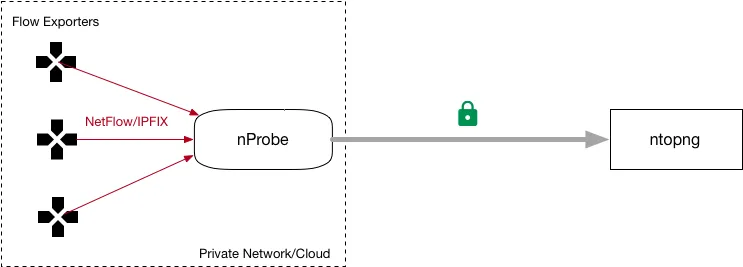
In this setup ntopng cannot poll the routers as they are on a private networks thus unreachable from ntopng. This means that ntopng cannot poll router interfaces via SNMP and thus to report symbolic interface names on the web GUI, and a workaround has to be identified in order to allow the collector to map interface id to names. This solution works when ntopng collects flows exported by nProbe. In this case you can:
- Poll the interface names via SNMP and save their name in a text file
- Use the
--snmp-mappingsoption in order to let nProbe know the interface names - Such names are propagated to ntopng via ZMQ (i.e. do not forget to specify
--zmq)
The --snmp-mappings option specifies the path of a text file containing the interface names of all flow
exporters collected by nProbe (collector mode), or of the host where nProbe is active (probe mode). The file format is
pretty straightforward: the first column is the flow exporter IP address, the second is the SNMP interface Id, and the
last column the SNMP interface name.
# AgentIP ifIndex ifName
#
127.0.0.1 1 lo0
127.0.0.1 2 gif0
127.0.0.1 3 stf0
127.0.0.1 4 en0
127.0.0.1 5 en1
127.0.0.1 6 en2
192.168.1.1 11 utun0
192.168.1.1 12 utun1
192.168.1.1 13 utun2
192.168.1.1 14 utun3
In order to ease the creation of such file, the nProbe package comes with a companion tool part of the nProbe package,
named /usr/bin/build_snmp_mappings.sh that you can use to create such file by polling the router via
SNMP. The tool syntax is straightforward as shown below:
$ /usr/bin/build_snmp_mappings.sh
Usage:   build_snmp_mappings.sh <SNMP agent IP> <SNMP version 1|2c> <SNMP community>

Example: build_snmp_mappings.sh 127.0.0.1 2c public > snmp_mappings.txt
         nprobe --snmp-mappings snmp_mappings.txt ...

$ /usr/bin/build_snmp_mappings.sh 127.0.0.1 2c public > snmp_mappings.txt
$ cat snmp_mappings.txt
         127.0.0.1 1 lo0
         127.0.0.1 2 gif0
         127.0.0.1 3 stf0
         127.0.0.1 4 EHC250
         127.0.0.1 5 EHC253
         127.0.0.1 6 en0
         127.0.0.1 7 en3
         127.0.0.1 8 en1
         127.0.0.1 9 p2p0
         127.0.0.1 10 fw0
         127.0.0.1 11 utun0
         # Agent InterfaceId Name
Using SNMP Mappings
Suppose nProbe to collect packets from interface en3 and sends them to ntopng in flow format. You need to start nProbe and ntopng as follows:
-
nprobe --snmp-mappings snmp_mappings.txt -i en3 --ntopng zmq://127.0.0.1:1234 -t 3 -d 3 -b 2 -u 7 -Q 7 ntopng -i zmq://127.0.0.1:1234
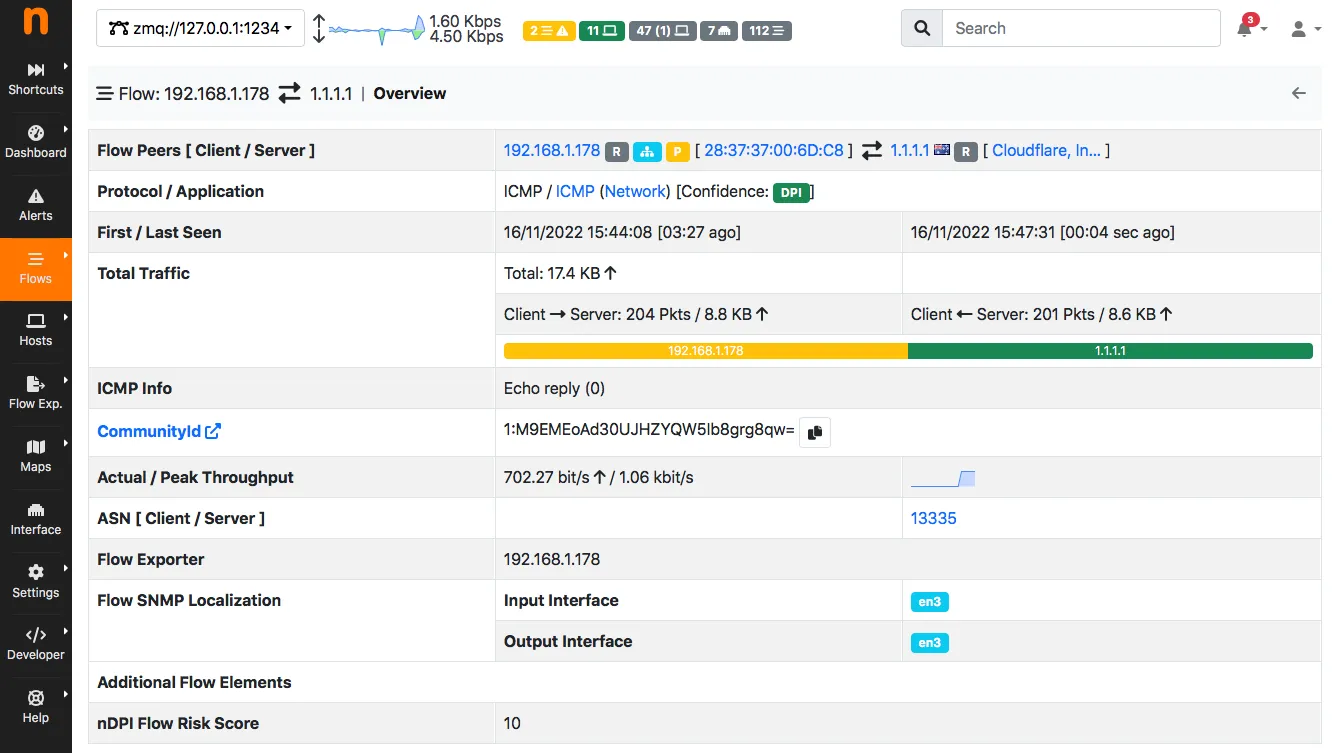
As you can see ntopng has been able to map the interface id to name (en3). Note that the above setup works both with ZMQ and Kafka.
If you want you can read more about this topic in the nProbe manual.
Enjoy !